Word search rules
Find all eight words from the list inside the letter grid. Every word stays on one straight line. Words may go left, right, up, down or along any of the four diagonals. They may be read forwards or backwards.
Select a word
Drag across the letters from one end to the other, then release on the last letter. Or tap its first and last letters. A complete listed word is highlighted and crossed off. A bent path or an unlisted string is not accepted.
A straight line
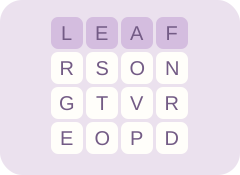
The letters L, E, A and F are next to each other in the top row. Select L and F to find LEAF. Selecting F and L works too.
Use the keyboard
Tab moves to the letter grid. Arrow keys choose a letter. Enter or Space selects the first endpoint; move to the final letter and press Enter or Space again. Escape clears the unfinished selection. Home and End move to the first or last letter in the current row.
Try a hint
Hint first letter marks the first letter of one unfound word. The message names that word. Look in all eight directions from the highlighted letter to finish its line.
Switch themes
All ten themes are fixed original boards. Changing themes preserves your finds in each grid. Next theme moves through the collection and returns to Garden after Pets. Undo word removes the last find. Restart theme clears the current theme after confirmation.
Brainzilla’s word search rules were used to check the hidden-word mechanism and direction variants. Lettergrove uses its own word lists, grids, artwork and selection interface.